
The player from colada.scripts now runs on Stream Deck. Start the show, trigger cues, control the stage—with the press of a button instead of a mouse. A studio-like experience for every event production.
Live broadcasts don’t tolerate delays. When a speaker steps off the stage, the video must start, and the next cue must be spot-on—the director can’t be the one chasing the mouse pointer across the screen. Half a second of searching, one click in the wrong window—and the moment is gone.
This is exactly where colada.scripts’ new Stream Deck integration comes in. Control shifts from the screen to a backlit keypad. One button, one action—no searching.
colada.scripts in a nutshell
colada.scripts is the tool for workflow and production schedules in colada. It consists of two parts that work together seamlessly.
The show is set up in Director: program elements, cues, sub-cues, timing, and stage presets. The entire sequence is created in a structured manner and can be modified right up until the last minute.
The player streams the event live—and serves as the shared reference on show day. The director, technical crew, host, and stage crew all see the same status, the same active cue, and the same next step. Starting now, you can control this very player using Stream Deck.
Why this works so well
Stream Deck is a widely used keypad with backlit displays—a standard feature in broadcast control rooms, studios, and among streamers. Each key is fully customizable and displays the exact icon of the function it triggers.
With the colada plugin, these two worlds come together exactly as they should in a professional studio: the hardware triggers actions in the player, and the player sets the tempo. For event productions, this reliability is worth its weight in gold.
Mapping—Full Control at Your Fingertips
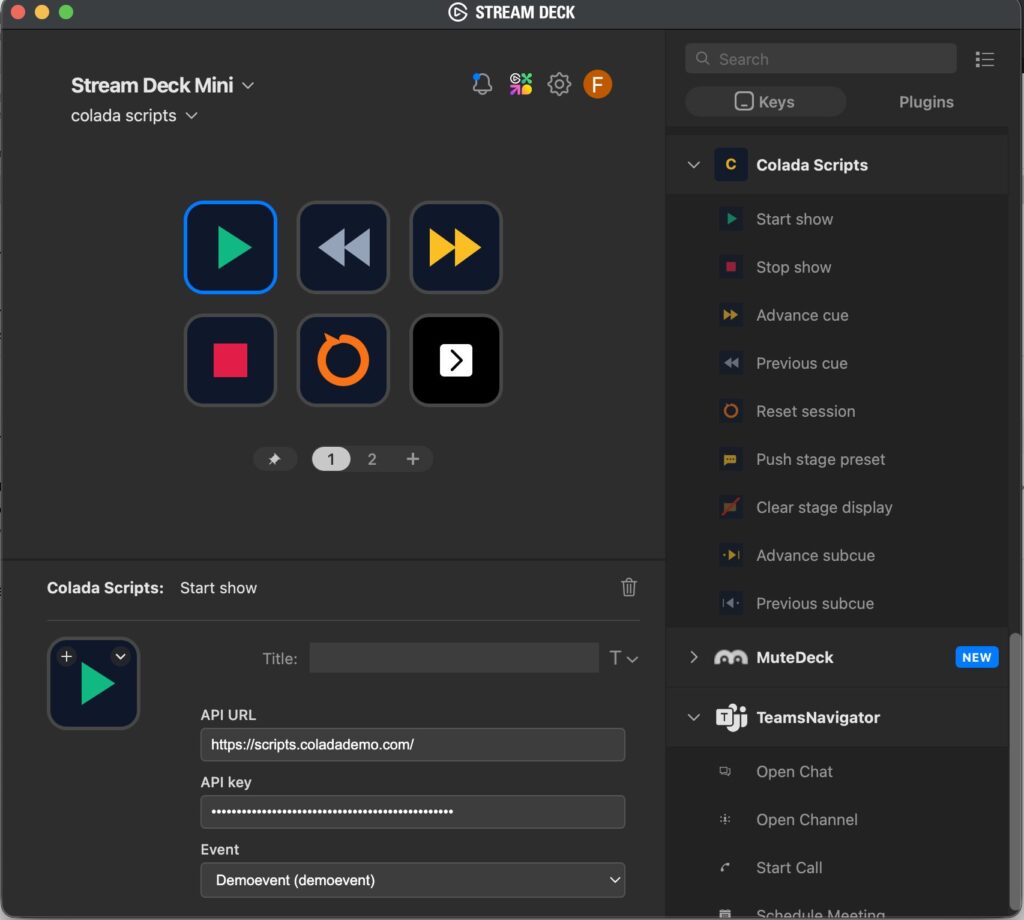
There are nine actions available in the plugin. Hover your mouse over a button to see what it does.
Start show
Startet die Show im Player. Der Event geht live, alle Beteiligten steigen synchron ein.
Why this changes the direction
01 Speed Instead of Mouse Chaos: A single keystroke triggers what used to require searching, aiming, and clicking. The next cue is ready the moment you need it.
02 Ergonomics for long shows: The gaze remains on the stage, the hand rests on the deck. No switching between mouse, keyboard and program item.
03 Clearly labeled, no accidental clicks: Each key displays its icon and color. No mix-ups, especially when things get hectic.
04 Studio standard that everyone knows: The same operating logic as in broadcast and streaming.
Ready to Go in Four Steps
- Install the plugin: Add “colada.scripts” to the Stream Deck software—directly from the Keys actions.
- Connect: Enter the API URL and API key from colada.scripts
- Select an event: Choose the appropriate event from the list—the buttons will now control that specific production.
- Assign buttons: Drag and drop actions onto the buttons. Done—the show can begin.
Curious about colada.scripts? Schedule a free demo and check out the player—with or without Stream Deck—live.